Note
Go to the end to download the full example code.
Run an image-based meta-analysis (IBMA) workflow
NiMARE provides a plethora of tools for performing meta-analyses on neuroimaging data. Sometimes it’s difficult to know where to start, especially if you’re new to meta-analysis. This tutorial will walk you through using a IBMA workflow function which puts together the fundamental steps of a IBMA meta-analysis.
import os
from pathlib import Path

import matplotlib.pyplot as plt
from nilearn.plotting import plot_stat_map

from nimare.extract import download_nidm_pain
Download data
Load Studyset
from nimare.nimads import Studyset
from nimare.utils import get_resource_path

studyset_file = os.path.join(get_resource_path(), "nidm_pain_studyset.json")
studyset = Studyset(studyset_file, target="mni152_2mm")
studyset = studyset.update_path(dset_dir)
Run IBMA Workflow
The fit method of a IBMA workflow class runs the following steps:
Runs a meta-analysis using the specified method (default: Stouffers)
Applies a corrector to the meta-analysis results (default: FDRCorrector, indep)
Generates cluster tables and runs diagnostics on the corrected results (default: Jackknife)
All in one call!
from nimare.workflows.ibma import IBMAWorkflow

workflow = IBMAWorkflow()
result = workflow.fit(studyset)
/home/docs/checkouts/readthedocs.org/user_builds/nimare/checkouts/stable/nimare/transforms.py:343: UserWarning: imgs are being resampled to the mask_img resolution. This process is memory intensive. You might want to provide a target_affine that is equal to the affine of the imgs or resample the mask beforehand to save memory and computation time.
  t = masker.transform(available_data["t"])
/home/docs/checkouts/readthedocs.org/user_builds/nimare/envs/stable/lib/python3.13/site-packages/nilearn/image/image.py:540: RuntimeWarning: overflow encountered in scalar negative
  infinity_norm = max(-data.min(), data.max())
/home/docs/checkouts/readthedocs.org/user_builds/nimare/checkouts/stable/nimare/transforms.py:343: UserWarning: imgs are being resampled to the mask_img resolution. This process is memory intensive. You might want to provide a target_affine that is equal to the affine of the imgs or resample the mask beforehand to save memory and computation time.
  t = masker.transform(available_data["t"])
/home/docs/checkouts/readthedocs.org/user_builds/nimare/envs/stable/lib/python3.13/site-packages/nilearn/image/image.py:540: RuntimeWarning: overflow encountered in scalar negative
  infinity_norm = max(-data.min(), data.max())
/home/docs/checkouts/readthedocs.org/user_builds/nimare/checkouts/stable/nimare/transforms.py:343: UserWarning: imgs are being resampled to the mask_img resolution. This process is memory intensive. You might want to provide a target_affine that is equal to the affine of the imgs or resample the mask beforehand to save memory and computation time.
  t = masker.transform(available_data["t"])
/home/docs/checkouts/readthedocs.org/user_builds/nimare/envs/stable/lib/python3.13/site-packages/nilearn/image/image.py:540: RuntimeWarning: overflow encountered in scalar negative
  infinity_norm = max(-data.min(), data.max())
/home/docs/checkouts/readthedocs.org/user_builds/nimare/checkouts/stable/nimare/transforms.py:343: UserWarning: imgs are being resampled to the mask_img resolution. This process is memory intensive. You might want to provide a target_affine that is equal to the affine of the imgs or resample the mask beforehand to save memory and computation time.
  t = masker.transform(available_data["t"])
/home/docs/checkouts/readthedocs.org/user_builds/nimare/envs/stable/lib/python3.13/site-packages/nilearn/image/image.py:540: RuntimeWarning: overflow encountered in scalar negative
  infinity_norm = max(-data.min(), data.max())
/home/docs/checkouts/readthedocs.org/user_builds/nimare/checkouts/stable/nimare/transforms.py:343: UserWarning: imgs are being resampled to the mask_img resolution. This process is memory intensive. You might want to provide a target_affine that is equal to the affine of the imgs or resample the mask beforehand to save memory and computation time.
  t = masker.transform(available_data["t"])
/home/docs/checkouts/readthedocs.org/user_builds/nimare/envs/stable/lib/python3.13/site-packages/nilearn/image/image.py:540: RuntimeWarning: overflow encountered in scalar negative
  infinity_norm = max(-data.min(), data.max())
/home/docs/checkouts/readthedocs.org/user_builds/nimare/checkouts/stable/nimare/transforms.py:343: UserWarning: imgs are being resampled to the mask_img resolution. This process is memory intensive. You might want to provide a target_affine that is equal to the affine of the imgs or resample the mask beforehand to save memory and computation time.
  t = masker.transform(available_data["t"])
/home/docs/checkouts/readthedocs.org/user_builds/nimare/envs/stable/lib/python3.13/site-packages/nilearn/image/image.py:540: RuntimeWarning: overflow encountered in scalar negative
  infinity_norm = max(-data.min(), data.max())
/home/docs/checkouts/readthedocs.org/user_builds/nimare/checkouts/stable/nimare/transforms.py:343: UserWarning: imgs are being resampled to the mask_img resolution. This process is memory intensive. You might want to provide a target_affine that is equal to the affine of the imgs or resample the mask beforehand to save memory and computation time.
  t = masker.transform(available_data["t"])
/home/docs/checkouts/readthedocs.org/user_builds/nimare/envs/stable/lib/python3.13/site-packages/nilearn/image/image.py:540: RuntimeWarning: overflow encountered in scalar negative
  infinity_norm = max(-data.min(), data.max())
/home/docs/checkouts/readthedocs.org/user_builds/nimare/checkouts/stable/nimare/transforms.py:343: UserWarning: imgs are being resampled to the mask_img resolution. This process is memory intensive. You might want to provide a target_affine that is equal to the affine of the imgs or resample the mask beforehand to save memory and computation time.
  t = masker.transform(available_data["t"])
/home/docs/checkouts/readthedocs.org/user_builds/nimare/envs/stable/lib/python3.13/site-packages/nilearn/image/image.py:540: RuntimeWarning: overflow encountered in scalar negative
  infinity_norm = max(-data.min(), data.max())
/home/docs/checkouts/readthedocs.org/user_builds/nimare/checkouts/stable/nimare/transforms.py:343: UserWarning: imgs are being resampled to the mask_img resolution. This process is memory intensive. You might want to provide a target_affine that is equal to the affine of the imgs or resample the mask beforehand to save memory and computation time.
  t = masker.transform(available_data["t"])
/home/docs/checkouts/readthedocs.org/user_builds/nimare/envs/stable/lib/python3.13/site-packages/nilearn/image/image.py:540: RuntimeWarning: overflow encountered in scalar negative
  infinity_norm = max(-data.min(), data.max())
/home/docs/checkouts/readthedocs.org/user_builds/nimare/checkouts/stable/nimare/transforms.py:343: UserWarning: imgs are being resampled to the mask_img resolution. This process is memory intensive. You might want to provide a target_affine that is equal to the affine of the imgs or resample the mask beforehand to save memory and computation time.
  t = masker.transform(available_data["t"])
/home/docs/checkouts/readthedocs.org/user_builds/nimare/envs/stable/lib/python3.13/site-packages/nilearn/image/image.py:540: RuntimeWarning: overflow encountered in scalar negative
  infinity_norm = max(-data.min(), data.max())

  0%|          | 0/21 [00:00<?, ?it/s]
  5%|▍         | 1/21 [00:01<00:33,  1.70s/it]
 10%|▉         | 2/21 [00:02<00:21,  1.16s/it]
 14%|█▍        | 3/21 [00:03<00:17,  1.05it/s]
 19%|█▉        | 4/21 [00:03<00:14,  1.17it/s]
 24%|██▍       | 5/21 [00:04<00:12,  1.25it/s]
 29%|██▊       | 6/21 [00:05<00:11,  1.31it/s]
 33%|███▎      | 7/21 [00:05<00:10,  1.35it/s]
 38%|███▊      | 8/21 [00:06<00:09,  1.37it/s]
 43%|████▎     | 9/21 [00:07<00:08,  1.39it/s]
 48%|████▊     | 10/21 [00:08<00:07,  1.41it/s]
 52%|█████▏    | 11/21 [00:08<00:06,  1.50it/s]
 57%|█████▋    | 12/21 [00:09<00:05,  1.57it/s]
 62%|██████▏   | 13/21 [00:09<00:04,  1.62it/s]
 67%|██████▋   | 14/21 [00:10<00:04,  1.67it/s]
 71%|███████▏  | 15/21 [00:10<00:03,  1.70it/s]
 76%|███████▌  | 16/21 [00:11<00:02,  1.73it/s]
 81%|████████  | 17/21 [00:12<00:02,  1.73it/s]
 86%|████████▌ | 18/21 [00:12<00:01,  1.74it/s]
 90%|█████████ | 19/21 [00:13<00:01,  1.77it/s]
 95%|█████████▌| 20/21 [00:13<00:00,  1.76it/s]
100%|██████████| 21/21 [00:14<00:00,  1.79it/s]
100%|██████████| 21/21 [00:14<00:00,  1.47it/s]
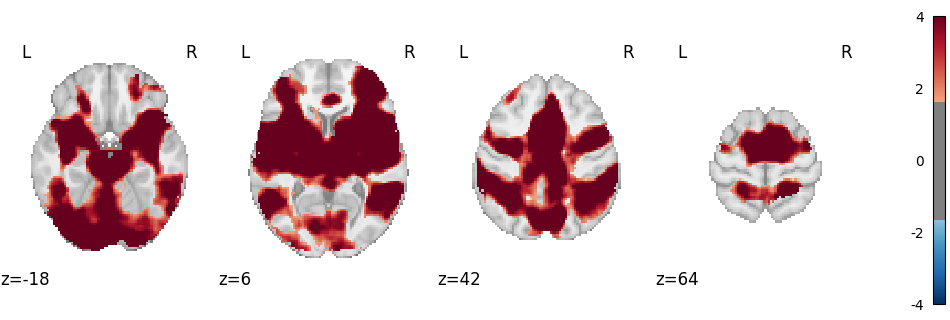
Plot Results
The fit method of the IBMA workflow class returns a MetaResult object,
where you can access the corrected results of the meta-analysis and diagnostics tables.
Corrected map:
img = result.get_map("z_corr-FDR_method-indep")
plot_stat_map(
    img,
    cut_coords=4,
    display_mode="z",
    threshold=1.65,  # voxel_thresh p < .05, one-tailed
    cmap="RdBu_r",
    symmetric_cbar=True,
    vmax=4,
)
plt.show()
Clusters table
result.tables["z_corr-FDR_method-indep_tab-clust"]
Contribution table
result.tables["z_corr-FDR_method-indep_diag-Jackknife_tab-counts"]
Report
Finally, a NiMARE report is generated from the MetaResult.
from nimare.reports.base import run_reports

# root_dir = Path(os.getcwd()).parents[1] / "docs" / "_build"
# Use the previous root to run the documentation locally.
root_dir = Path(os.getcwd()).parents[1] / "_readthedocs"
html_dir = root_dir / "html" / "auto_examples" / "02_meta-analyses" / "12_plot_ibma_workflow"
html_dir.mkdir(parents=True, exist_ok=True)

run_reports(result, html_dir)
/home/docs/checkouts/readthedocs.org/user_builds/nimare/checkouts/stable/nimare/reports/figures.py:688: UserWarning: kwargs['alpha']=0.7 detected in parameters.
Overriding with transparency=None.
To suppress this warning pass your 'alpha' value via the 'transparency' parameter.
  fig = plot_img(
Total running time of the script: (0 minutes 36.625 seconds)